Tag Archives: gadget man

Becoming a Highwayman: How I Put Myself Inside an Inkantation Graphic Novel

One of the most enjoyable things about developing new technology is reaching the point where you can stop asking, “Will this work?” and begin asking, “What else could we do with it?”

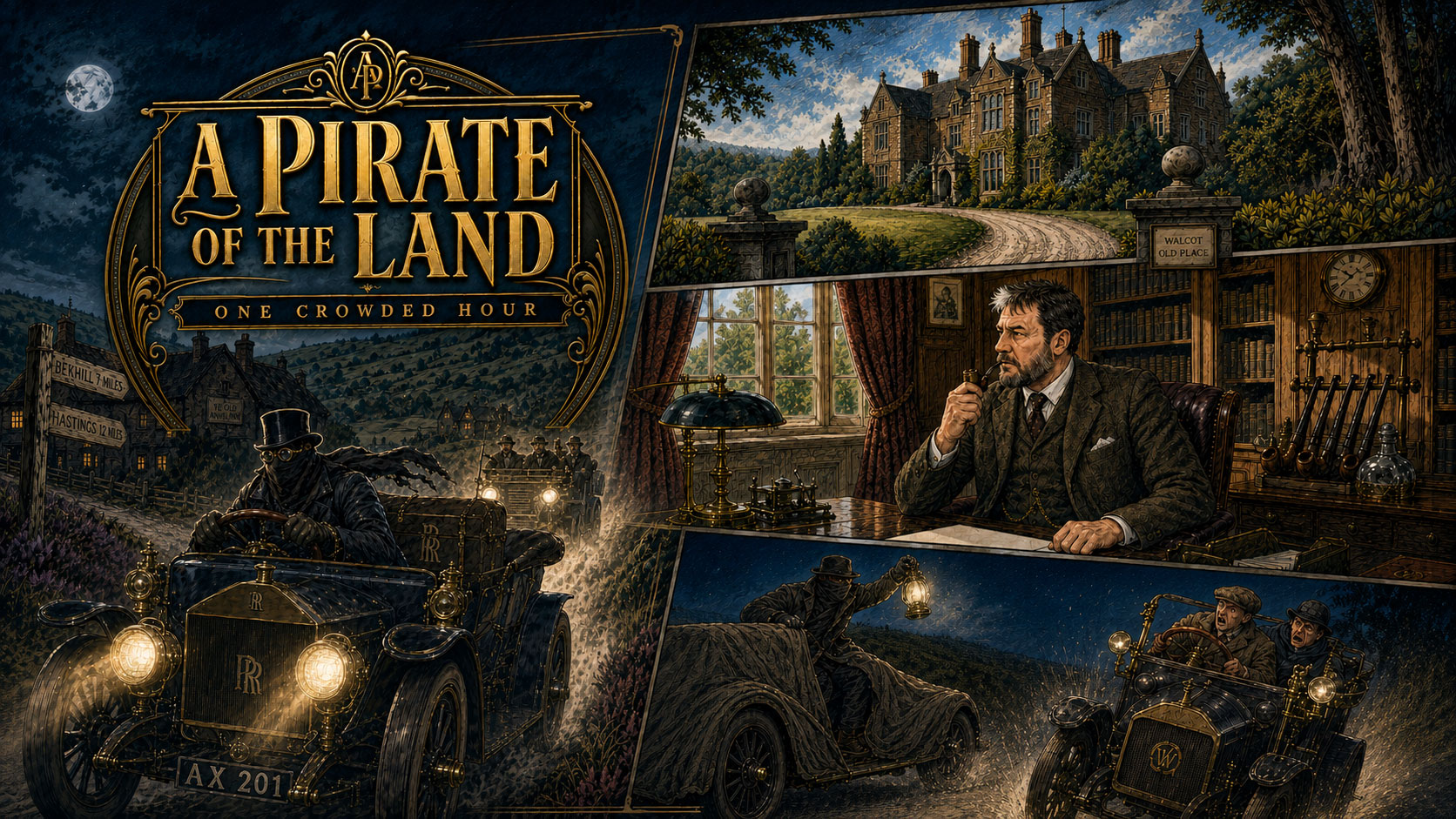
My latest experiment with Inkantation, the graphic novel creation system I have been developing, involved adapting the classic tale A Pirate of the Land: One Crowded Hour. However, this time I decided to take the experiment a little further.

I put myself into the story.

Not merely as a background character, an anonymous face in a crowd or an unfortunate passer-by. I cast myself as Sir Henry Hailworthy, the wealthy Edwardian gentleman at the centre of the tale, who also happens to have a rather dramatic secret life as a modern-day highwayman.

Becoming a Highwayman: How I Put Myself Inside an Inkantation Graphic Novel

A Pirate on the Roads of Edwardian England

A Pirate of the Land: One Crowded Hour is set during the early days of motoring, when motor cars were still magnificent, temperamental machines and the sight of one roaring along a lonely country road could be an event in itself.

The story opens on the Eastbourne to Tunbridge road late on a Sunday night. A mysterious Rolls-Royce, partly concealed beneath brown fabric, prowls through the darkness. Its broad, burly driver wears a Tyrolean hat, a heavy coat and, when another motorist approaches, a dark cloth mask.

Armed with a long-barrelled Mauser pistol, he becomes a highwayman for the motor age.

He stops an elderly Wolseley, confronts a young motorist named Ronald Barker, encounters two actresses travelling in a Humber and finally targets the man he has really come to find, a wealthy financier whose actions have ruined the lives of others.

The finished Inkantation script runs to 21 graphic novel pages and uses 22 individually planned assets, including characters, vehicles, props and locations. These range from the masked highwayman and his concealed Rolls-Royce to Edwardian studies, country roads, jewellery, packages, pistols and the wonderfully imposing sixty-horsepower Daimler limousine.

Turning the Story into a Graphic Novel

Inkantation does not simply take a piece of prose and create a random collection of illustrated pages.

The first stage is adaptation.

The original story is analysed and reorganised into a structured graphic novel script. Each page is divided into panels, with descriptions covering the viewpoint, composition, lighting, expressions, action, captions and dialogue.

For example, the opening page contains three panels. The first establishes the lonely road and the approaching Rolls-Royce. The second moves closer to reveal the strange fabric concealing the vehicle. The third introduces the driver, hunched over the wheel with the glowing ember of a cigarette beneath the brim of his hat.

This creates a cinematic progression from landscape, to vehicle, to character.

Before the finished panels can be produced, Inkantation creates an asset catalogue. Every important character, location, vehicle and object receives its own detailed reference description. This is vital because a graphic novel depends upon visual continuity.

Ronald Barker must look like Ronald Barker every time he appears. The Rolls-Royce must remain recognisable from panel to panel. Sir Henry’s study needs to feel like the same room, whether it is shown in a wide establishing shot or as the background to an intense conversation.

Without that preparation, characters can subtly change faces, costumes, ages and proportions from one page to the next.

Becoming a Highwayman: How I Put Myself Inside an Inkantation Graphic Novel

Casting Myself as Sir Henry Hailworthy

For this particular book, I manually added myself to the production process and used my own appearance as the basis for Sir Henry Hailworthy.

Sir Henry is described in the Inkantation asset catalogue as a stocky, bearded Edwardian gentleman in a well-cut tweed country suit, usually seen with a pipe in his study. Most importantly, his build must also be consistent with the mysterious highwayman encountered earlier in the story.

This meant I was effectively being cast in two connected roles: the respectable country gentleman and the masked figure stalking the roads at night.

There was something wonderfully entertaining about seeing a version of myself transported into Edwardian England, sitting behind a mahogany desk, confronting an angry visitor and attempting to explain why I had spent the previous evening robbing motorists at gunpoint.

It also presented an interesting technical challenge.

It is relatively straightforward to create a single stylised portrait of a person. It is much harder to preserve that identity through multiple panels, facial expressions, viewpoints, costumes and lighting conditions.

A character may be seen seated at a desk in one panel, turning towards a window in another and confronting someone across a room in the next. In the highwayman sequences, the same character is partly hidden beneath a hat, heavy coat and mask.

The visual system still needs to give the reader enough clues to believe that these are the same person.

Becoming a Highwayman: How I Put Myself Inside an Inkantation Graphic Novel

More Than a Personal Cameo

Adding myself to the book was partly for fun, but it was also a genuine product experiment.

Would readers pay to appear in a graphic novel?

Personalisation already exists in children’s books, where a child’s name may be inserted into a story. Inkantation potentially takes that idea much further. Rather than simply changing a name, a customer could be visually cast as a character throughout an illustrated narrative.

Someone could become a detective in a Victorian mystery, the captain of a pirate ship, an explorer on another planet or, as in my case, an Edwardian gentleman with a concealed life of motorised crime.

It could also work as a highly unusual gift.

Imagine presenting someone with a professionally printed graphic novel in which they are the hero, villain or eccentric supporting character. Couples could appear together in a romantic adventure. A family could be placed inside a fantasy story. A business could even commission a graphic novel featuring members of its own team for training, promotion or an anniversary celebration.

Naturally, there are questions still to explore.

How much personalisation would someone want? Would they prefer to play the hero, or would being the villain be more entertaining? Should the story be selected from an existing catalogue, or written especially for them? How closely should the artwork resemble the real person, and how much should it embrace the graphic novel style?

These are exactly the kinds of questions that experiments are designed to answer.

Combining Art, Storytelling and Technology

Inkantation brings together several areas that have interested me throughout my life.

I have been drawing and creating characters for around 50 years. I have also spent more than 20 years running a web design and technology business. Graphic novels allow those two worlds to meet.

The system handles the complex production work, including script preparation, asset management, visual consistency, panel generation, dialogue placement and page assembly. However, the creative decisions still matter.

Which moment deserves a full-width panel? When should the reader see a close-up? How much of the original narration should remain? What expression should a character have? Where should a page end to encourage the reader to turn over?

Technology can help produce the images, but storytelling remains at the heart of the process.

One Crowded Hour

The title comes from Sir Henry’s own excitement when the adventure is over. Despite promising never to repeat it, he admits that his brief career as a highwayman was exhilarating.

He describes it as one crowded hour of glorious life.

That line also feels appropriate for my experience of making the book. For a brief period, I was no longer sitting at my computer working on a graphic novel system.

I was Sir Henry Hailworthy.

I had a Rolls-Royce hidden beneath brown fabric, a Mauser pistol in my hand and unfinished business waiting on a lonely road.

Whether people will pay for the opportunity to star in their own graphic novel remains to be seen, but as an experiment it has opened another fascinating possibility for Inkantation.

And I must admit, seeing yourself revealed as the mysterious highwayman is considerably more exciting than appearing in the background of a holiday photograph.

You can purchase A Pirate of the Land : One Crowded Hour is available to download in Kindle format

Commodore Callback 8020: The Flip Phone That Helps You Switch Off

The Commodore Callback 8020 combines retro styling, modern essentials and a refreshingly firm rejection of endless scrolling. For me, the Commodore name also brings back memories of the VIC-20 that first led me into coding

There are certain technology brands that immediately transport you back to a particular moment in your life.

For me, Commodore is one of them.

As a teenager, I owned a Commodore VIC-20. By modern standards, it was extraordinarily limited, but to me it felt like a doorway into the future. It was the machine that introduced me to programming and started me on the path into coding, computers and, eventually, the career I have today.

So when Commodore announces a new piece of hardware, I cannot help but take notice.

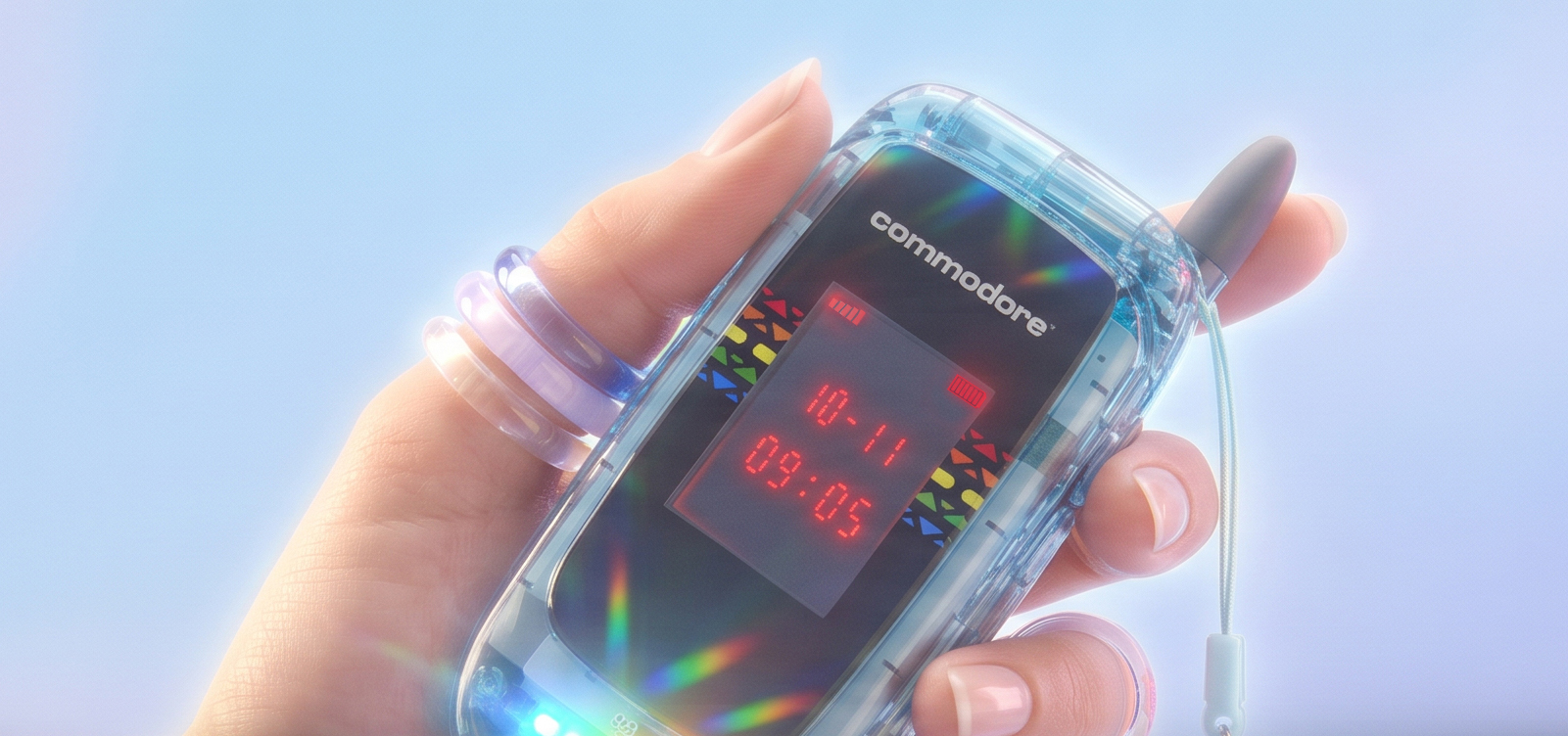
The latest arrival is called the Commodore Callback 8020, and it is not another conventional smartphone competing to offer more apps, more notifications and more reasons to stare at a screen.

Instead, Commodore has created a flip phone designed to help us disconnect.

A Phone That Is Smart Enough

Commodore describes the Callback 8020 as the phone between a smartphone and a dumbphone.

It does not include conventional web browsing or social media. Those features are blocked at system level, rather than merely hidden behind parental controls or screen-time reminders. The idea is to remove the temptation altogether.

At the same time, the Callback is not completely cut off from the modern world. It supports messaging through services including WhatsApp, Signal and Telegram, alongside SMS and MMS. It also offers maps, podcasts, music, voice notes, QR code scanning, a calendar, a Wi-Fi hotspot and other practical tools. ls like an interesting compromise.

Many so-called minimalist phones go so far in removing functionality that users end up carrying a smartphone as well. The Callback appears intended to retain enough useful features to become an everyday phone, while removing the applications and services most likely to pull you into hours of scrolling.

Email and workplace apps are not offered through the Callback app store either, although Commodore says advanced users will be able to sideload compatible apps, apart from blocked browsers and social platforms. The message is clear: when you have finished work, you should be able to finish work. ish OS Rather Than Android

The Callback 8020 runs a customised version of Sailfish OS, developed in partnership with Finnish technology company Jolla.

Sailfish is a Linux-based mobile operating system with roots in the work carried out by former Nokia engineers. It provides an independent alternative to the familiar Android and iOS ecosystems.

Commodore says the phone can run more than 99 per cent of Android applications through a secure compatibility environment, although apps that depend heavily on Google Play Services, including some banking applications, may not work completely. There is no Google Play Store and no standard Google account requirement. e of us who remember when the computer market was filled with genuinely different platforms, operating systems and ideas, that in itself is rather appealing.

Proper Retro Details

Commodore has not simply stuck its logo on a generic flip phone.

The Callback includes several details intended to connect it with the company’s computing history. It features SID-inspired ringtones and music playback, a selection of Commodore 64 games and an external display influenced by Commodore calculators from the 1970s.

There is also a replaceable battery, interchangeable rear covers and a proper 3.5mm headphone socket. These are all things that used to be perfectly normal before smartphones became sealed glass rectangles that were almost impossible to personalise or repair.

The phone also includes five softly glowing notification LEDs. Rather than constantly lighting up the main screen with messages and alerts, the LEDs can provide simple indications that something requires your attention. A physical privacy switch can also be used to disconnect the device when you really want to go off-grid. act of closing a flip phone creates a natural endpoint. You finish the call or message, snap the handset shut and put it away. There is no glowing screen waiting to offer another video, notification or suggested post.

More Capable Than It Looks

Although the Callback is deliberately restrained, the hardware is not entirely basic.

It includes a 48-megapixel Sony rear camera, a front-facing camera for video calls, HD audio hardware, an FM radio and support for lossless music. The phone uses a MediaTek Helio G81 processor with 4GB of memory and 64GB of internal storage.

Connectivity is limited to 4G rather than 5G, but that decision fits the product’s philosophy. This is not a phone intended for streaming endless high-resolution video. It is designed for calling, messaging, navigation, music and other everyday tasks. has Snake, which feels compulsory for any flip phone with Nokia engineering heritage somewhere in its family tree.

The Commodore Connection

The Callback name is also a clever piece of Commodore history.

The model number follows the Commodore 8010 modem, while also referencing the company’s association with the 1980s and the phone’s early-2000s design influences. Commodore even sold a branded rotary telephone in Canada during the 1980s, so this is not technically the company’s first phone. however, the emotional connection remains the VIC-20.

That computer did not try to conceal how it worked. You switched it on and were presented with a BASIC prompt. It encouraged experimentation. You could type something, run it and immediately see what happened.

It invited you to participate rather than simply consume.

That experience led me into coding and helped shape a lifelong fascination with technology. It is why the Commodore name still means something to me more than four decades later.

The Callback 8020 is a very different machine, but I can see a little of that original philosophy in it. Technology should be useful, understandable and enjoyable. It should help us do something, rather than constantly demanding our attention.

Price and Availability

Pre-orders for the Commodore Callback 8020 are now open, with the latest official product listing showing prices starting at $399 before tax.

It will be available in several distinctly Commodore colour schemes, including BASIC Beige, ProtoPET White, SX Silver, a translucent Starlight Edition and a gold-accented Founders Edition. UK customers should be aware that orders are processed in US dollars and VAT is added where required. not a review, and I have not handled or tested the Callback 8020. It is still progressing through final software optimisation and regulatory compliance testing, so real-world performance and battery life remain to be seen. less, I find the idea enormously appealing.

At a time when almost every technology company is competing for more of our attention, Commodore is proposing a phone that actively encourages us to put it down.

For someone whose journey into technology began with a Commodore VIC-20, it is genuinely exciting to see the name attached to something imaginative again.

The Callback 8020 may look backwards for its styling, but its central idea could hardly be more relevant to the way we live today.

I created my own awesome comic strip using ChatGPT

Every now and again, a piece of technology comes along that makes me grin like a child who has just found a secret compartment in a toy robot. This week, that technology was ChatGPT image generation.

I started with a simple idea: what if The Gadget Man was not just a blog, a podcast, or a bloke surrounded by cables, 3D printers, strange gadgets and half-finished ideas, but an actual comic book hero?

Not a cape-wearing superhero. Not someone bitten by a radioactive soldering iron. Just a gadget-loving chap with a cup of tea, a slightly dangerous number of ideas, and the ability to solve problems with technology, common sense and the occasional dramatic pose.

So I gave ChatGPT a photo of myself and typed the following prompt:

This is The Gadget Man, create a 2 page american style comic strip about him stopping a cyber attack by martians

First Draft of The Gadget Man

And there it was. A full two-page comic book spread featuring The Gadget Man battling Martians who were attempting to take over Earth’s systems. It had panels, speech bubbles, glowing screens, alien spaceships, dramatic lighting, and just the right amount of over-the-top comic book nonsense.

There was one small problem. In the final panel, instead of the crowd saying “Thanks Gadget Man!”, the speech bubble said “Thanks Gadget Giant Man!”

So I simply replied:

the last panel says THANKS GADGET GIANT MAN!, it should say THANKS GADGET MAN!

And ChatGPT corrected it.

The Gadget Man and The Alien Cyber Attack

That was the moment it really clicked. This was not just asking a computer to make a picture. This was creative direction. I could guide the scene, spot issues, refine the result, and build a series.

The Gadget Man Comic Universe Begins

Once the first comic was created, I did what any sensible adult would do. I immediately made several more.

The next prompt was:

Excellent, create another comic about Gadget Man visiting Scotland and saving them from EV Charger problems

The Gadget Man and the Mystery of the Scottish EV Chargers

This produced a wonderfully ridiculous adventure in which The Gadget Man travels north of the border to rescue Scotland from faulty EV chargers, broken apps, signal problems and confused motorists. There were Highland cows, charging stations, Scottish scenery, and, naturally, the sort of technological tinkering that saves the day.

Then came one of my favourites:

Create another comic featuring Gadget Man 3d Printing an elaborate controller for use with his VR headset to play Elite Dangerous

The Gadget Man and the 3d Printed Elite Dangerous Controller

This one was pure Gadget Man territory. 3D printing, VR, Elite Dangerous, switches, buttons, joysticks, wiring, and a controller that looked as though it had been designed by someone who had spent far too long thinking, “You know what this game needs? More buttons.”

After that, Vanessa joined the adventure.

Create another comic featuring Gadget Man and his sidekick wife Vanessa. Their adventure is finally getting away for a break at the coast

Gadget Man and Vanessa go to the Coast

The result was a seaside adventure featuring Gadget Man and Vanessa finally escaping for a well-earned break, only to find that even a trip to the coast can turn into a heroic mission when technology, transport and holiday chaos collide.

Of course, Vanessa deserved a break from all this madness, so I followed up with:

Create another comic featuring Gadget Man looking after the house whilst Vanessa spends two well deserved days at a Spa Retreat

The Gadget Man: Vanessa goes to the Spa

This produced a domestic disaster story full of smart home alerts, robot vacuums, laundry mountains, kitchen chaos and Gadget Man attempting to maintain order while Vanessa relaxed in peace. In other words, science fiction with a suspicious amount of truth in it.

Finally, I went bigger. Much bigger.

create another comic book featuring Gadget Man. This time he goes to the ISS to correct it’s orbit

The Gadget Man Saves the ISS

Yes, The Gadget Man went to space. The International Space Station had an orbital problem, and naturally the only person qualified to give it “a little nudge” was a man with a tool belt, a mug of tea, and an alarming level of confidence.

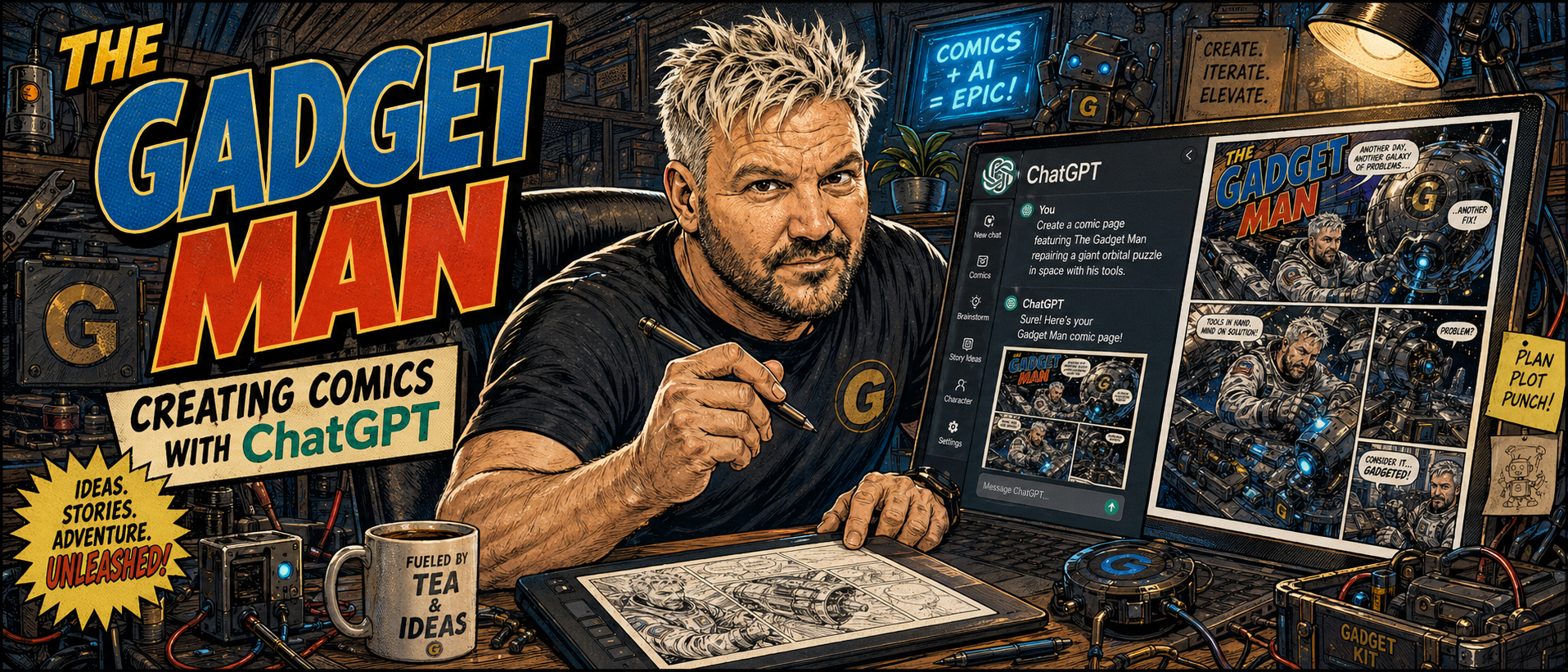
To finish the project, I also created a header image for this very article:

create a header image in the same style showing The Gadget Man creating the comic using ChatGPT

I created my own awesome comic strip using ChatGPT

That image showed The Gadget Man at his desk, creating comics using ChatGPT, surrounded by gadgets, screens, sketches, tools and the usual creative chaos. It perfectly captured what this whole experiment was about.

Why This Is Possible Now

What makes this so interesting is not simply that ChatGPT can generate an image. Image generators have existed for a while. The difference now is the conversational workflow.

OpenAI describes ChatGPT Images as a tool that can create new images and edit existing ones directly inside ChatGPT. You can ask for an image in plain English, refine it, adjust the composition, and explore new visual directions without needing to start from scratch each time. OpenAI also notes that recent image generation models are designed to follow prompts more accurately, render text more effectively, and use chat context, including uploaded images, as visual inspiration

That last point is important. I was not typing a technical command into a complicated art package. I was having a conversation. I could say “make this a two-page American-style comic strip”, then “change that wording”, then “now do one in Scotland”, then “now add Vanessa”, and ChatGPT understood the creative thread.

It feels less like using software and more like working with an incredibly fast illustrator, layout artist, letterer and visual brainstorming partner, all rolled into one.

The Magic Is in the Iteration

The real power here is not the first image. It is the second, third, fourth and fifth version.

Traditional creative work often involves a long gap between idea and result. You sketch, brief, wait, revise, wait again, make changes, and eventually arrive at something close to what you imagined.

With ChatGPT, the loop is much shorter. You can create a concept, respond to it, correct it, extend it, and build a whole fictional world in minutes. OpenAI’s own guidance highlights this ability to generate and refine images using clear prompts, request variations, adjust composition or size, and produce polished visuals quickly.

For someone like me, with a head full of odd ideas, half-remembered pop culture references, gadgets, stories, jokes, and technical rabbit holes, this is incredibly powerful.

I do not need to stop at “Wouldn’t it be funny if…”

I can actually see it.

What This Means for Artists

Now, this is where things become more complicated.

As exciting as all this is, it also raises serious questions for artists, illustrators, designers and the wider creative industry.

On one hand, tools like ChatGPT could be hugely empowering. They allow people who cannot draw to visualise ideas. They help writers create concept art. They help small businesses produce mock-ups, campaign ideas, storyboards, social media graphics and playful content that might previously have been out of reach.

For independent creators, this could be a revolution. A blogger can create a comic strip. A podcaster can build a visual world. A small business can prototype adverts. A game designer can test character ideas. A 3D printing enthusiast can imagine packaging, instructions, posters, comics and product artwork without needing a full design department.

But there is another side.

Professional artists have every right to be concerned. If companies decide to replace commissioned artwork with AI-generated images purely to save money, that has consequences. If the visual language of artists is absorbed, imitated and mass-produced without care, credit or fair compensation, that is not something we should casually ignore.

There is also the question of value. Art is not just the finished image. It is experience, taste, judgement, intention and human interpretation. A good artist does not simply “make a picture”. They solve visual problems. They understand emotion, framing, symbolism, storytelling and audience. AI can generate astonishing things, but it does not live a life. It does not have childhood memories, favourite comics, personal grief, humour, nostalgia or the strange little sparks that make human creativity so fascinating.

A Tool, Not a Replacement for Imagination

The way I see it, ChatGPT does not remove the need for creativity. It shifts where the creativity happens.

The prompt matters. The idea matters. The direction matters. The ability to look at an image and say “that is nearly right, but the final speech bubble is wrong” matters.

In my Gadget Man comic experiment, ChatGPT created the images, but the idea came from a very human place: my own interests, my humour, my love of gadgets, my fondness for comic book drama, my 3D printing obsession, my VR tinkering, my family life, and my lifelong habit of turning ordinary things into stories.

That is where I think these tools are at their best. Not replacing imagination, but amplifying it.

The Future of Comic Creation?

Will AI-generated comics replace traditional comics? I hope not.

Will they change how people make comics? Almost certainly.

We may see writers using AI to storyboard ideas before handing them to professional artists. We may see artists using AI for rough concepts, layouts, backgrounds or experimentation. We may see hobbyists creating personal comics for fun, families, blogs and social media. We may also see new kinds of hybrid workflows where human creators and AI tools sit side by side.

There will be arguments, and there should be. Creative industries need rules, ethics, transparency and respect for human artists.

But there is also something genuinely wonderful about being able to type a sentence and watch a ridiculous idea become visible.

Final Thoughts

What started as a quick experiment became a whole mini comic universe.

The Gadget Man fought Martians, fixed Scotland’s EV chargers, 3D printed a controller for Elite Dangerous, went on holiday with Vanessa, survived domestic chaos during a spa weekend, corrected the orbit of the ISS, and then sat down to create the comics using ChatGPT.

That is absurd.

It is also brilliant.

For me, this is exactly what technology should do. It should unlock ideas. It should make us laugh. It should help us create things that would otherwise remain trapped in our heads.

And if it occasionally turns “Gadget Man” into “Gadget Giant Man”, well, that is all part of the adventure.

Another day. Another gadget. Another comic created.

Gadget Man Signing Off

Bambu Lab to Reveal the H2C at Formnext – and I’ll Be There to See It First-Hand

Bambu Lab have officially announced the launch of their new multi-material 3D printer, the Bambu Lab H2C, taking place on 18 November 2025 at 3:00 PM CET—and I’ll be there at Formnext in Frankfurt to witness the reveal in person.

This is shaping up to be one of the most significant announcements in desktop 3D printing for years.

For the past three years, Bambu Lab have been working on a cleaner, more efficient approach to multi-colour and multi-material printing. Their teaser hints at something genuinely ground-breaking: the end of purge waste.

Back in 2022, the X1 series opened the door to accessible multi-colour printing, but the trade-off was always the same—purging. Endless little strings of wasted filament, time lost, and the compromises that every multi-colour printer still struggles with today.

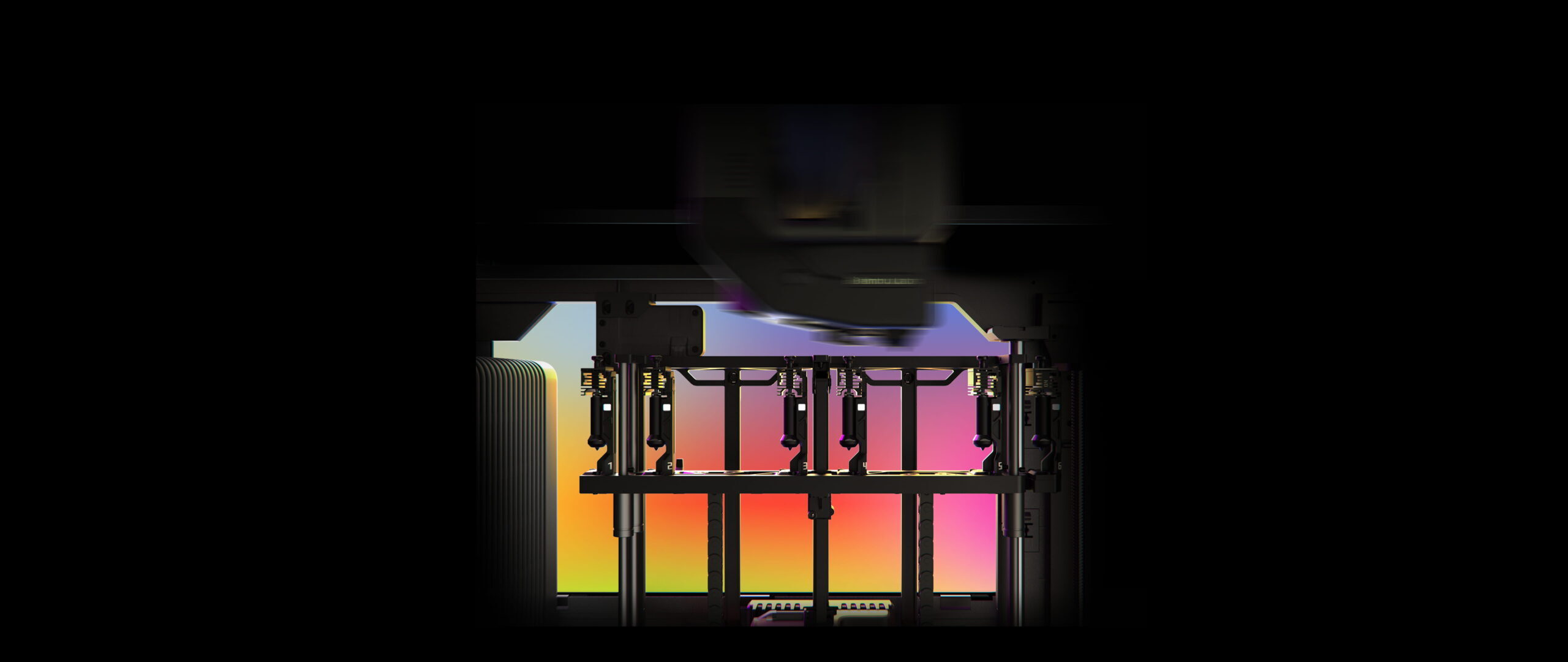
Bambu’s engineers zeroed in on the real culprit: contamination within the hotend. Their solution? Don’t purge—swap the hotend.

Image and Video Credit: Bambulab

Introducing the Vortec Hotend Change System

The H2C is expected to showcase a brand-new technology called Vortec, described as one of the first induction-heated, fully automated hotend-swap systems.

The innovations highlighted in the teaser include:

• Dedicated hotends instead of purging

Like using a fresh paintbrush for each colour. No cleaning required, no cross-contamination, and no filament waste.

• Induction heating in just 8 seconds

Rapid heating without the slowdown of bulky toolheads or complex gantries.

• Wireless data and power sync

Each hotend contains its own chip that communicates temperature, filament data and status to the printer—without cables or pogo pins to wear out.

• No sacrifice in speed, volume or reliability

Rather than adding multiple nozzles or loading a heavy toolhead, Bambu Lab have focused on keeping things fast, compact and robust.

According to Bambu Lab, Vortec represents “the epilogue to the imperfections of X1” and marks their first major step toward eliminating purge altogether.

I’ll Be Reporting Live from Formnext

As The Gadget Man, I’ll be on the ground at Formnext in Frankfurt when the H2C is unveiled. Expect hands-on impressions, photos, early thoughts and—as always—my honest take on whether this could be the next revolution in multi-material 3D printing.

Stay tuned. This could be the moment multi-colour printing finally becomes clean, fast and… uncompromising.

The Gadget Man – Episode 183 – Are We Addicted to Apps?

In the latest episode of The Gadget Man, I joined Lorna Bailey on BBC Radio CWR to explore a topic that’s close to all our smartphones — apps. From checking our health and managing our money, to securing our homes and snapping hundreds of photos we never quite get around to backing up, apps have become the digital wallpaper of our lives.

But here’s the big question: Have we become too reliant on them? And are there risks lurking in our seemingly innocent app folders?

During this episode, we chat candidly about the app overload many of us experience. Whether it’s a dozen different parking apps or a folder full of CCTV apps just for one house (guilty as charged), we’ve all felt the weight of digital clutter and the anxiety of deleting an app in case we “might need it someday.”

We also talk about the very real risks of having so much of our data connected to apps and the internet — and how tech companies benefit from our every tap and swipe. While some of this data helps deliver useful services, like live traffic info, it also opens doors to targeted ads, invasions of privacy, and even scams.

Tips for Staying Safe in an App-Heavy World:

  • Only download apps from reputable sources like Apple App Store, Google Play, or Amazon’s App Store.

  • Avoid sideloading apps from unknown third-party websites — that’s where trouble can start.

  • Keep apps up to date — security patches are often part of these updates.

  • Use antivirus apps to scan for threats, especially on Android devices.

  • Be mindful in public when making payments with your phone — contactless tech can be abused.

  • Back up your photos and data regularly to avoid heartbreak if your device is lost or damaged.

There’s also a moment of digital self-reflection: Are we hoarding apps the same way we hoard random kitchen gadgets — “just in case”? You’re not alone. I’ve got folders of unused apps, too.

And while we’re talking about clutter, let’s not forget the thousands of photos we store and forget — until it’s too late. If there’s one takeaway from this episode, it’s this: Back. Up. Your. Photos. Whether it’s to iCloud, Google Photos, or any other cloud service, it could save your most precious memories.


Listen to the full episode to hear all the laughs, insights, and a few home truths about our app obsessions — and maybe get inspired to finally sort out your own digital drawers!


Want to chat more about this topic? Drop a comment below or ping me on social media @gadgetmanblog — I’d love to hear about your app habits, fears, and favourites!

Anycubic Kobra S1 Combo – CoreXY 3D Printer – An indispensable tool for professionals and hobbiests

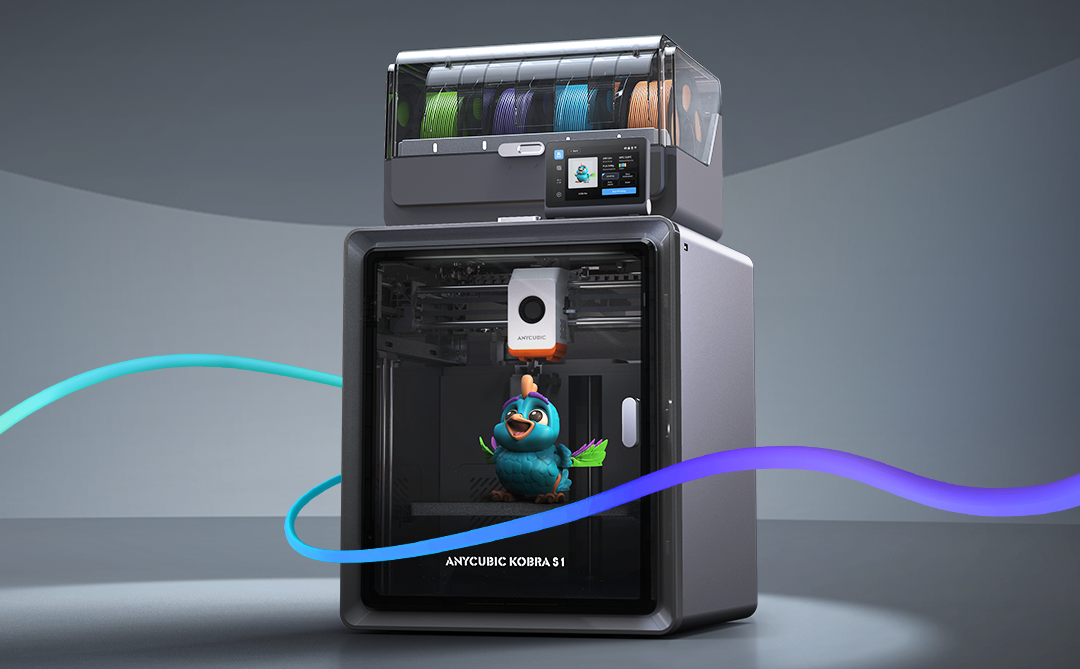
If you’ve been following my reviews on The Gadget Man, you’ll know I have a deep appreciation for innovation and practicality, particularly when it comes to tech that enables creativity. Enter the Anycubic Kobra S1 – a device that has transformed my 3D printing experience and firmly established itself as an indispensable tool in my workshop. After clocking over 100 hours of printing with this machine, I can confidently say it’s a game-changer in the world of consumer-grade 3D printers.

Anycubic Kobra S1 Combo

Dimensions and Specifications

The Anycubic Kobra S1 Combo boasts a compact yet highly functional design. It operates at 46dB in standard mode and an impressively quiet 44dB in quiet mode, making it suitable for home and office environments. The maximum nozzle temperature of this printer reaches an impressive 320°C, allowing for compatibility with a variety of filament types. Additionally, the print head features a quick-release mechanism, simplifying maintenance and filament swaps. With a build volume of 250 x 250 x 250 mm, it offers ample space for a wide variety of projects while maintaining a manageable footprint. The printer’s enclosed design ensures consistent environmental conditions, and the carbon filter reduces fumes, particularly useful when printing with materials like ABS. The sturdy frame and high-quality components reflect Anycubic’s commitment to durability and reliability. The machine’s heated bed, capable of reaching temperatures up to 120°C quickly, is paired with a magnetic PEI print bed, ensuring excellent adhesion during printing and easy removal of finished models. and its precision extruder provide a professional-grade 3D printing experience.

Anycubic S1 Combo - CoreXY 3D Printer - An indispensable tool for professionals and hobbiests
Anycubic S1 Combo – CoreXY 3D Printer – An indispensable tool for professionals and hobbiests

Unboxing and Package Contents

The Anycubic Kobra S1 arrives neatly packaged with everything you need to get started. The box includes the main printer components, a toolkit, a sample filament, the 4-reel multi-colour ACE unit, and a detailed user manual. The inclusion of these extras reflects Anycubic’s commitment to delivering value and convenience to users. The unboxing experience is satisfying, and the care in packaging ensures everything arrives in pristine condition.

Assembly and Initial Setup

Straight out of the box, the setup process is impressively straightforward. The clear and concise user manual walks you through installing the print head, screen, and filament holder. Even for those new to 3D printing, the step-by-step instructions make assembly approachable and stress-free. Connecting the multi-colour ACE unit is a simple task, and the machine is designed for intuitive use. Within an hour, I had the printer fully assembled and ready to begin its first calibration.

One standout aspect of the setup process is the printer’s resonance compensation system. During initial configuration, the Kobra S1 moves the print head rapidly in a controlled pattern to measure vibrations. This data allows the printer to adjust and compensate for resonance during printing, resulting in smoother, more accurate outputs. This feature is particularly impressive as it demonstrates Anycubic’s dedication to precision and innovation.

Anycubic S1 Combo - CoreXY 3D Printer - An indispensable tool for professionals and hobbiests
Anycubic S1 Combo – CoreXY 3D Printer – An indispensable tool for professionals and hobbiests

Software and User Interface

The Anycubic Kobra S1 supports widely-used slicing software like Cura and Anycubic’s own Photon Workshop. It is compatible with a range of nozzle diameters, including the standard 0.4mm as well as 0.2mm, 0.6mm, and 0.8mm options for expanded versatility in project designs. These platforms offer intuitive interfaces and extensive options for fine-tuning your prints. Once the software is installed, connecting the printer is a breeze, and the user-friendly touchscreen interface on the printer itself makes controlling print jobs straightforward. It’s a well-thought-out ecosystem that bridges functionality and ease of use.

Performance and Material Versatility

In terms of performance, the Kobra S1 punches well above its weight. I began with PLA and PLA+, and the results were remarkable. Prints exhibited exceptional precision, fine details, and consistent layer adhesion. The enclosed design minimizes environmental factors, ensuring stable and reliable results.

Venturing into ABS printing was where the Kobra S1 truly shined. The enclosed chamber with a carbon filter ensured stable temperatures, reducing warping and odours. The heated bed and high-performance extruder proved their worth, handling ABS effortlessly and delivering smooth, robust prints. The addition of the multi-colour ACE unit enabled stunning multi-material prints, allowing for creative designs that were previously out of reach with single-extruder systems.

Before using the Kobra S1, I was limited to manual filament changes when attempting multi-colour prints. The Kobra S1’s full support for multi-colour printing has been a revelation, saving time and reducing errors. However, it’s worth noting that the use of prime towers for filament flushing can lead to some filament waste, a consideration for those conscious of material efficiency.

Standout Features

The heating 4-reel multi-colour ACE unit is undoubtedly the crown jewel of the Kobra S1. This innovative unit is also heated, allowing for in-print filament pre-heating, which ensures consistent material flow and print quality. The quick-release print head further enhances convenience, making it easy to swap or maintain the unit. The Kobra S1 also supports advanced features like Pressure Advance and Flow Calibration, ensuring optimal performance and precision across a range of printing scenarios. This innovative unit is also heated, allowing for in-print filament pre-heating, which ensures consistent material flow and print quality. This advanced feature facilitates seamless multi-material and multi-colour printing, unlocking unparalleled creative potential. Whether it’s intricate models, functional prototypes, or artistic creations, the ACE unit’s reliability and precision make it a joy to use.

Another highlight is the auto-levelling system. This feature eliminates one of the most common frustrations in 3D printing—manual bed levelling. With the Kobra S1, you can count on a perfectly levelled print bed every time, ensuring optimal print quality from the very first layer.

Safety and Maintenance

Anycubic has also prioritised user safety and maintenance ease. The enclosed design minimizes exposure to fumes, especially when working with ABS. Routine maintenance is simplified with easy access to key components and a helpful guide in the user manual. The sturdy build ensures durability, making this printer a long-term investment.

Value for Money

The Anycubic Kobra S1 stands out as an affordable yet feature-rich 3D printer. Priced competitively, it delivers professional-grade results that rival much more expensive models. With its ability to handle a wide range of materials, including PLA, PLA+, and ABS, and its advanced multi-material capabilities, the Kobra S1 offers exceptional value for hobbyists, tinkerers, and small businesses alike.

Conclusion

In conclusion, the Anycubic Kobra S1 sets a new standard for consumer-grade 3D printers. Its versatility, reliability, and professional-grade performance make it a standout choice for both beginners and experienced makers. From the heating 4-reel multi-colour ACE unit to its intuitive design, exceptional print quality, and advanced resonance compensation system, this printer offers an unparalleled user experience. If you’re in the market for a feature-packed 3D printer that doesn’t break the bank, the Anycubic Kobra S1 is a top contender. Highly recommended!

Don’t forget to enter the special offer code GADGETMAN to get a further £20 discount on your order!


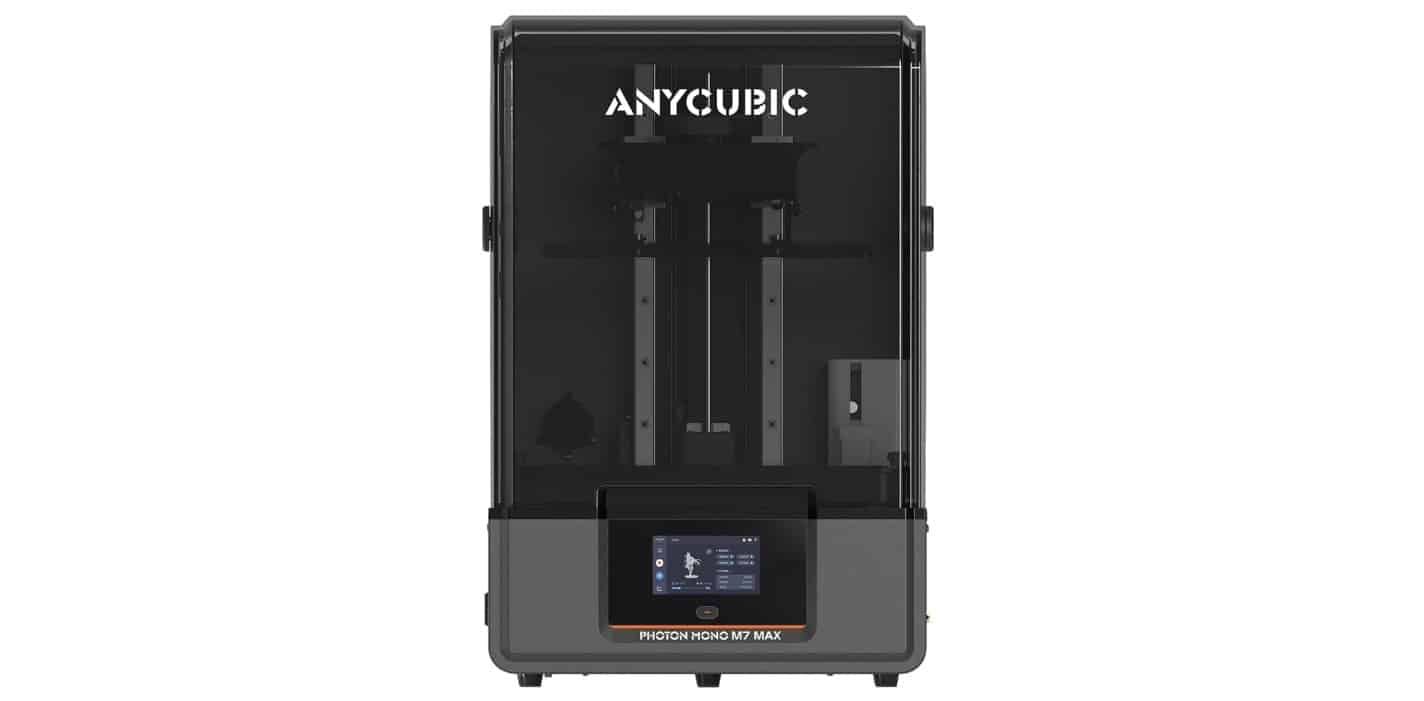
Upcoming Review: ANYCUBIC Photon Mono M7 Max Resin 3D Printer – A Game Changer for Large-Scale Resin Printing?

I’m excited to share that I’ll soon be getting hands-on with the brand-new ANYCUBIC Photon Mono M7 Max Resin 3D Printer, one of the most anticipated launches in the world of 3D printing. Known for their innovative approach to resin printing, ANYCUBIC has truly upped the ante with this model, and I’m thrilled to see what it can do.

A Closer Look at the ANYCUBIC Photon Mono M7 Max

This machine boasts some impressive specifications, especially for those of us who love pushing the limits of 3D printing. Here’s what sets it apart:

  • Huge Build Volume: With a massive print area of 298mm × 164mm × 300mm, this printer allows for the creation of large-scale models in a single print. Whether you’re into cosplay props, intricate game terrains, or detailed full-size masks, the Mono M7 Max seems designed to take on any project without the need for cutting or assembly.
Upcoming Review: ANYCUBIC Photon Mono M7 Max Resin 3D Printer – A Game Changer for Large-Scale Resin Printing?
  • Advanced Light Source: The LighTurbo 3.0 system, featuring a COB light source and Fresnel lens, claims to provide exceptional light uniformity (90%+) and precision. This combination promises to minimize layer lines and aliasing, resulting in smoother and more refined prints.
  • Speedy and Convenient Design: Time is of the essence, especially in large-scale printing, and the Mono M7 Max is built with efficiency in mind. With a top printing speed of 60mm/h, it’s twice as fast as the previous model, the Photon M3 Max. The flip-open cover design makes it easier to access prints, allowing for single-handed operation and a hovering angle feature.
  • Smart Resin Management: For anyone who has dealt with resin printing, the management of resin can be a bit of a hassle. This machine’s dynamic temperature control keeps the resin at optimal print temperatures, and it also includes an auto-fill feature to automatically refill the resin vat and recycle remaining resin with just one touch. It’s promising features like this that could make a real difference in daily use.

What to Expect in My Review

As soon as the ANYCUBIC Photon Mono M7 Max arrives, I’ll be diving straight in to test its capabilities. From its speed and print quality to its ease of use and resin management features, I’ll be putting this printer through its paces. Expect detailed print tests and an honest assessment of how it performs on projects both big and small.

Stay tuned for my full review coming soon on The Gadget Man! If you’ve got questions or specific things you’d like me to test, drop a comment or reach out – I’d love to include your input in the review.

You can now preorder the ANYCUBIC Photo Mono M7 Max and use the coupon code of MATTPORTER to avail of a £25 discount at checkout.

The Gadget Man General Election Special Part Two – We Love Hitchin Interviews – Bim Afolami Conservate Party Candidate for Hitchin Constituency

The We Love Hitchin Interviews 2024 were conducted by Gadget Man, Matt Porter, the founder of We Love Hitchin.

Matt took the initiative to interview each candidate running for the Hitchin Constituency in the General Election, providing an in-depth look at their visions and plans for the community.

You can view the interview below or listen to the podcast episode by clicking the play-head above.


Welcome to the We Love Hitchin Interviews 2024! As part of our series, we are sitting down with each candidate running for the Hitchin Constituency in the upcoming General Election on the 4th of July 2024. In this interview, we have the pleasure of speaking with Bim Afolami, the Conservative Party candidate.

Join us as we delve into Bim Afolami’s vision for Hitchin, exploring his plans for economic stability, public safety, and community development. Discover his stance on key issues such as infrastructure, business support, and education. Bim shares his dedication to fostering a prosperous and secure future for Hitchin and its residents.

Interview Breakdown

00:00 Opening Titles 00:09 Welcome from Matt Porter, Founder of We Love Hitchin Facebook Group 01:09 Welcome to Bim Afolami

  • 01:16 Background and Motivation: Bim shares his background and explains his motivation for running in the new Hitchin Constituency.

02:06 Q1: Cost of Living Crisis

  • 02:33 A1: Bim discusses measures to alleviate financial pressures caused by the rising cost of living.

08:05 Q2: NHS and Healthcare

  • 08:37 A2: Bim outlines his plans to improve healthcare services, reduce waiting times, and address staffing shortages in the NHS.

12:40 Q3: Economy

  • 13:14 A3: Bim’s strategies for addressing inflation, unemployment, and ensuring economic stability.

17:44 Q5: Crime

  • 17:58 A5: Bim’s plans to enhance personal safety and improve the effectiveness of law enforcement in the community.

20:41 Q6: Housing

  • 20:57 A6: Measures to address the housing crisis, particularly focusing on affordability and availability for younger people and those on lower incomes.

Community Questions

23:32 Andrea’s Question on Water Companies

  • 24:45 Bim’s Response: Bim answers Andrea’s question about voting on a motion to bring water companies back into the public sector.

27:45 Nyland and Lauren’s Question on Gaza War and Palestine Recognition

  • 28:06 Bim’s Response: Bim discusses the provision of arms or assistance in the Gaza conflict and the recognition of Palestine as an independent state.

30:58 Vanessa and Nicola’s Question on Special Needs Education and Care

  • 31:49 Bim’s Response: Bim addresses the concerns of SEN families, pledging improved support and resources.

36:01 Bim’s Closing Appeal

  • 36:17 Bim asks for your vote: Bim Afolami explains why he should be chosen as the representative for Hitchin on the 4th of July.

39:11 Matt Porter’s Thanks and Closing Remarks 40:19 Closing Titles


Election Results for Hitchin Constituency 2024

The General Election results for the Hitchin Constituency have been announced. Here are the final tallies:

  • Bim Afolami (The Conservative Party Candidate): 14,958 votes
  • Charles Bunker (Reform UK): 6,760 votes
  • Sid Cordle (Christian Peoples Alliance): 181 votes
  • Will Lavin (Green Party): 2,631 votes
  • Chris Lucas (Liberal Democrats): 4,913 votes
  • Alistair Strathern (Labour Party): 23,067 votes – Elected

Congratulations to Alistair Strathern, the newly elected Member of Parliament for Hitchin! His victory marks a significant shift in the constituency, and we look forward to seeing his plans for Hitchin come to fruition.